Auto renew of SDC Membership Subscriptions
One thing to remember about a subscription is to renew it when it becomes due. One method we offer on membership subscriptions to assist with this and your budgeting are membership subscriptions covering monthly, annual or every 3 years. When purchasing a Membership subscription the relevant other options should appear alongside when you get to the checkout. If you add an alternative then remember to also remove your original purchase form your basket before paying also!
A very useful aspect is also enabling Auto renew of your membership subscription. For card payments we use the internationally recognised Stripe payment system which has all the required security measures and keeps these up to date. Hence the most the SDC can see of your payment card details is just the last 4 digits of the card, expiry date and issuing bank name. In other words your payment card details are kept very securely, adhering to all required legislation, and not on SDC servers or databases.
The ability to turn on, and indeed off, Auto renew is entirely within your control. The SDC is not able to switch this on or off, with or without your knowledge.
So, how can you do this or even just check how it is set for your membership subscription?
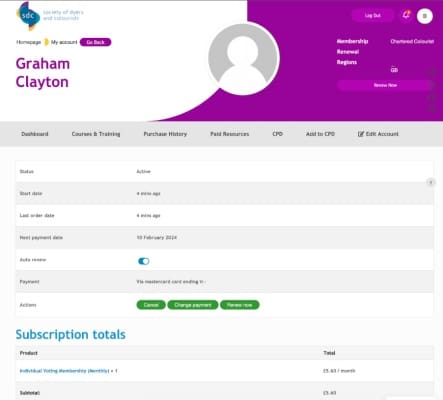
When you purchase a Membership Subscription you can view details in the Members Area Purchase History (large green central icon) where you will see your membership purchase with the Order Number quoted on the email you received, the date of purchase and the price (which is the best indicator if you have also ‘purchased’ free webinar recordings etc also). In those Order Details there is a smaller green icon called ‘View’ to the right hand side of the order line – click that and you will see details similar to the screen shot below.
This is a useful reference section regardless of Auto renew, as you can also see when you took out the membership subscription (which is likely to differ from the first date of joining the SDC), when the next payment date is due and if a card is stored for your payment.
You should also see a toggle switch for Auto renew so you can switch on or off automatic renewal payments at any time. If Auto renew is off and you have no card details stored then when you switch it on you will be asked for card details then.
That’s it – come back any time to check your membership status and ensure your membership subscription will automatically renew when due.
Note that if membership subscription prices change (typically early January each year) then you will be notified of such changes by email. We also will not use your payment card details for any other transactions as a result of Auto renew (to reiterate the point at the start we cannot see your card details and we cannot use authorisation here for any other transactions).